School trips, cell phone plans, new winter shoes – anyone co-parenting knows how often the topic of money leads to unnecessary discussions. With our finance feature, we take the emotions out of your billing. We focus on absolute transparency, pinpoint fairness, and a process so simple that you’re spared the annoying task of balancing the books at the end of the month. Everything is documented, securely stored, and easily settled in the end.
1
Flexible Splitting & the 100% Log
Fair splitting – according to your rules.
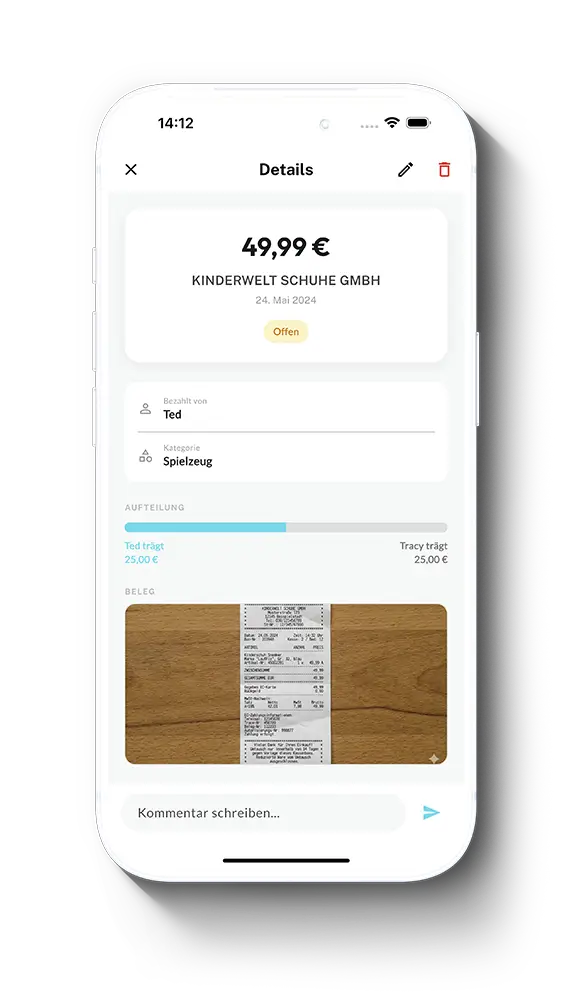
Do you split costs 50/50 by default or do you have a custom ratio like 70/30? You can adjust the split individually for every category or single task. Sometimes you might pay for something 100% on your own but still want to record it in the family log for the sake of completeness. You can do that with one click, without the other Parent being charged.

02
Smart Data Entry
Take a photo of the receipt. The AI does the rest.
Save yourself the tedious task of typing in amounts. Just snap a photo of the receipt – our smart text recognition automatically reads the merchant and the exact amount for you. Organize your expenses into flexible categories (like clothing, school, or leisure) to see exactly where the money went at the end of the year.
03
Recurring Expenses
Subscriptions and clubs on autopilot.
The monthly cell phone plan, soccer club membership, or fixed allowance: just add recurring expenses once. CoParently remembers them automatically, splits the costs on the due date, and puts them on your shared billing list right on time.
04
Settlement & Confirmation Workflow
Settle up without uncomfortable follow-ups.
When it’s time to settle the costs, the app shows you the exact balance. Simply securely store your PayPal.me address or bank details in the app (cash payments can also be noted). As soon as the money has been transferred, the recipient confirms receipt with one click. The expense is immediately marked as “settled” and disappears from your open to-do list.
05
Export & Cleanup
Receipts for taxes? Just one click.
Whether for the youth welfare office, a lawyer, or your annual tax return: you can export all payments and digitized receipts cleanly as a PDF or CSV file at any time. And to keep your dashboard clear, all previously settled payments can be deleted from the view in bulk.
06
Finance Report
Keep track instead of doing the math.
No more guessing about child costs. The finance report shows you at a glance how your expenses are trending over the months and how they are distributed across categories, children, and both parents. With one tap, you can switch between total costs and your own share – transparent, fair, and without any Excel spreadsheets.
07
Absolute Privacy
A protected space. Only for parents.
Finances are a strictly private matter and are nobody else’s business – especially not the children’s. That’s why this entire functional area is strictly blocked and completely invisible to third parties (like grandparents, new partners, or child accounts). Only you two as parents have access to this sensitive data.
Try it for free for 14 days – then you decide.
Fair, transparent, and
no subscription traps.
Start your new beginning completely risk-free. Download CoParently and get immediate access to all PRO features. After 14 days, your account will automatically switch to the permanently free Basic mode. You don’t need to cancel anything.